I was never really comfortable using the heading “How to use The Book” but I just couldn’t think of anything better, so I stuck with it! I mean, it’s obvious how you use a book, isn’t it? You just open it up and read. Ahh! but not this one. It was always my intention that a ‘reader’ (or more accurately ‘viewer/participant’) of this fully interactive book should be able to follow their interest or line of enquiry by clicking one of several available links to various different sections that contain related or relevant subject matter. Rather than a physical book of linear design that has printed paper pages which are meant to be read in order, I always visualised The Book as an e-book comprising a network of interconnected chapters that are fully animated. I suppose you could compare the idea to a narrated, CGI version of ‘Wikipedia’ that enables its viewers to choose (through a series of clickable options) the direction of their journey of discovery/interest. But rather than constituting a vast online database of inter-linked pages that contain freely available knowledge (for which fully referenced information has been gathered by thousands of researchers and contributors), The Book has resulted from the dreamed perceptions of just a single individual; transcribed and compiled over the course of several decades. …I guess in that respect it’s nothing like the world’s most comprehensive encyclopedia really, although, to be fair, I did start writing this several years before Wikipedia was even conceived! Indeed, the similitude that I prefer to make is one of a lucid dreamer passing through the scenes of their choosing, deciding what to explore, which direction to take, and when to return to their waking reality.
On reflection, I could have used something obvious like ‘Instructions’ or ‘Help & Tips’ for the heading of this bit, but I also wanted to add a little bit more information about The Book too. So what follows is a brief descriptive guide to the clickable links (so far) and how best to navigate the various sections. At the end is another link to more information about The Book, including the story of its inception, planned improvements, and my vision for the final version.
* Please note that for the free, online version, only three chapters [“The Predictors“, “The Unfolding Future (…to science fact)”, and “Apocalyptic Scenarios“] withinThe Book of Logical Futures are available and fully linked. Full Access is currently being prepared. For further information, please click the ‘Full Access Information’‘ button at the bottom of this page.
★ New Feature
If you would prefer to listen rather than simply read,
Listening to The Book
explains how the new narration system works, including the talking-head icons, pause-point icons and dedicated Listen page.
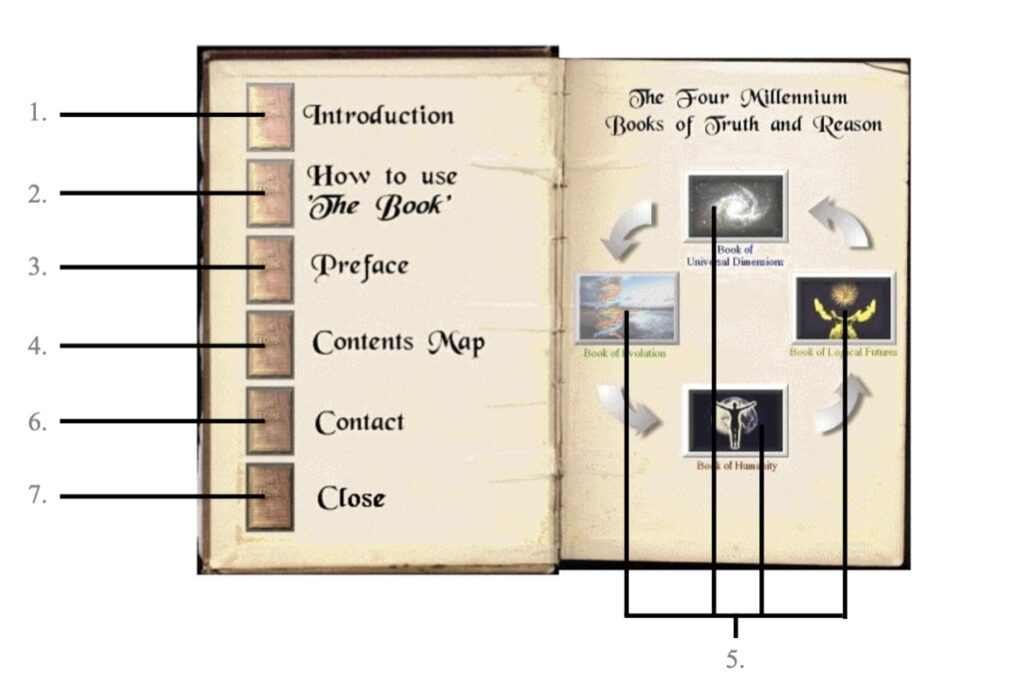
On opening The Book you are presented with this representation of an ‘inside cover’ (which was lifted from an old GIF file I created back in 2000). It has ten clickable links, allowing readers to navigate through its many pages – ‘cherry-picking’ topics that they may find of interest.
A brief introduction to The Book. (clicking on the rotating book at the top of the page will return you to the inside cover)
This section that you are currently on contains instructions and advice on navigating The Book. (to return to the inside cover – click on the rotating book at the top of the page)
This, the original ‘preface’, was largely written just after conceiving of The Book, and was based around the idea that the state of ‘randomness’ simply cannot exist in a universe where everything we experience adheres to the same laws of nature (as defined by modern classical physics). Indeed, above the quantum world, anything that may appear random must have underlying order and therefore, by extension, everything in our macroscopic world is ultimately predictable. From the geology of Earth to human thought, the preface asserts the idea that nothing escapes this universal law of ‘logical consequence’, setting up the different chapters of The Book to expound this notion in more detail through a wide range of topics. (to return to the inside cover – click on the rotating book)
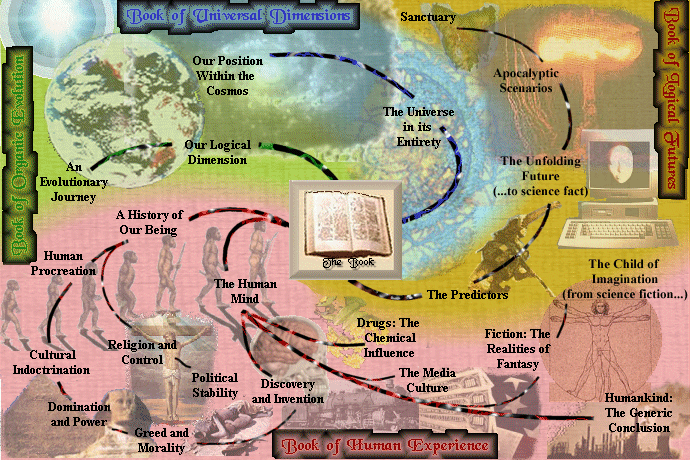
The ‘contents map’ provides one of two ways to access the chapters within The Book, and acts as an anchor point around which this first version is structured. It is set out as a (somewhat feeble) representation of the visceral imagery that awaited me whenever I opened my original dreamed version of The Book. I am afraid my talents do not lay in producing visually alluring computer graphics, but the contents map is intended as a focal point to access the various chapters at a glance. From here there are various options, but first it is best to explain what is represented before you. The Book, as a whole comprises four unequally-sized ‘colour-coded’ narratives which are laid out in the contents map. They are as follows:
The Book of Universal Dimensions (2 chapters),
The Book of Organic Evolution (2 chapters),
The Book of Human Experience (14 chapters),
The Book of Logical Futures (4 chapters).
Clicking on any of these four headings will take you to an interactive ‘contents list’ relating to that particular part of
The Book (more about that shortly), whilst clicking on the central image of an open book will return you to the inside cover. In addition to these links, every one of the twenty-two chapter titles on this contents map is also a clickable link that will transport you to the relevant ‘table of contents’ for that chapter.* Once there, you are presented with several options.
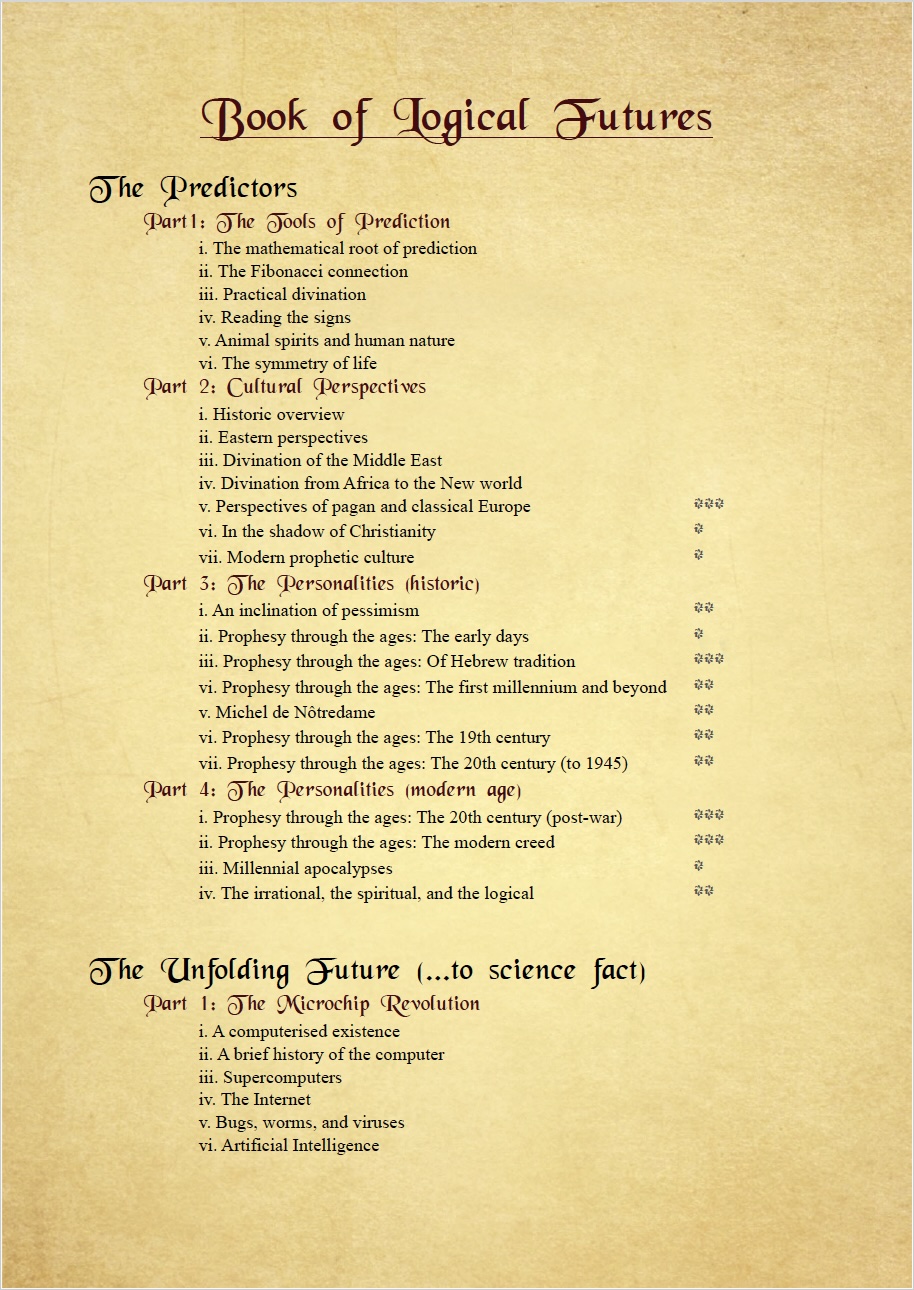
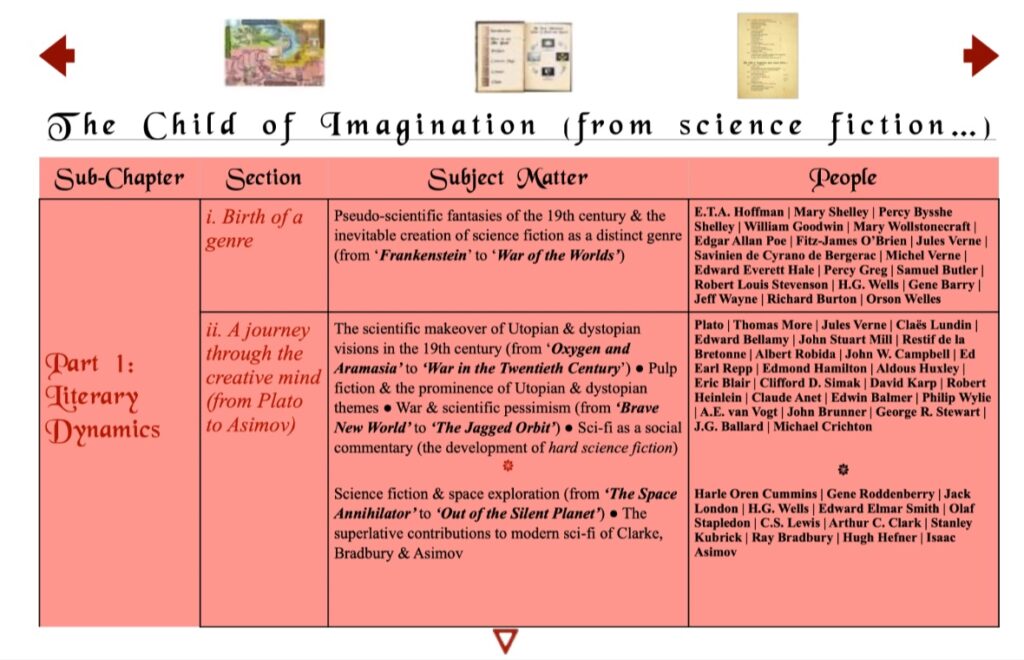
Each chapter has its own dedicated table of contents (TOC). The TOC for most of the chapters within The Book are separated into four headed columns which are titled as follows: ‘Sub–chapter’ | ‘Section’ | ‘Subject Matter’ | ‘People’. The first of these columns contain hypertext links to the start of each chapter (or in the case of larger chapters, to the start of a subchapter).
In the second column are the italicised titles of the various ‘sections’ within that chapter or subchapter. These are loosely ordered using Roman numerals so as to maintain an element of coherence, and they also consist of hypertext that is linked to the relevant parts of The Book. The third column within the TOC contains a brief description of the subject matter within that section. Whilst the bullet points themselves aren’t directly linked, the largest sections are further separated using ‘pause-breaks’ which are represented by a * symbol. Like the hypertext links in the first two columns, these pause-break (*) symbols are coloured according to their chapter, and act as clickable links back and forth between the TOC and the pause-breaks that appear within the larger sections of The Book, enabling the reader to jump to a particular part of them.* The final column lists the names of anyone who is mentioned within that specific section. Connecting each name to its relevant Wikipedia page, this part of the TOC is now fully interactive in the premium version.
In addition to these links within the TOC, there are a number of clickable icons and arrows above and below the table itself. The three icons along the top are linked to the pages that they represent; i.e. the ‘contents map’, the ‘inside cover’ and the ‘contents list’. These are flanked by two arrows ( and ) that connect the TOC to those of adjacent chapters. Whilst there may be no beginning or end chapter per se, these arrows effectively create a rotary access point to the narration through the various TOCs. At the end of each TOC, a clickable symbol will return you to the top.
The second way to access the chapters within The Book from the inside cover is through the pictured boxes on the facing page.** These provide links to the interactive ‘contents list’ for each of the twenty-two chapters. Representing the four colour-coded narratives that make up The Book, by clicking on any one of these boxes you will be taken to the start of the contents list for that chosen narrative.
This consists of a list of the chapters along with their numbered sub-chapters (if they have any) and the titles of the sections within them. All of these headings are clickable links.* The Chapter title (in black) will take you to the relevant TOC, whilst the section headings (also in black) will take you to the corresponding part of the TOC. The numbered sub-chapter headings (in colour) will take you directly to the narration itself. For chapters that do not contain any sub-chapters, the first section (i) is coloured and linked directly to the start of the narration. By clicking on the main (coloured) heading at the top of the page you will be taken to the ‘contents map’ from where it is possible to navigate to any part of The Book. Please note; the * symbols on the contents list are ‘greyed-out’ and are not linked to the TOC or directly to the chapter narration at present but are primarily there to indicate how many pause-breaks exist within that section.
Originally added with a view to possibly building a website around The Book, the ‘contact’ link takes you to the email address that I am currently using for any correspondence.
To close The Book before you put it down!
Once you have accessed the narration, there are several ways to return. By clicking the main heading at the start of each chapter or sub-chapter you will be returned to the corresponding TOC. Whenever a chapter or sub-chapter is further divided into sections, they are separated by a row of ten ********** symbols which, like the main headings, are coloured according to the chapter they belong to. These too are clickable links back to the TOC. The bracketed headings of individual sections are also links, but these will take you to the contents list for that particular chapter. Clicking the symbol at the end of each section, will return you to the beginning of it.
One of the best ways to digest the information within this online version of the The Book is to pick a chapter that rouses your curiosity and go to its TOC. Check out the subject matter for each section, working your way though the table. If any bits jump out, feel free to investigate – you can return to the TOC by clicking on the pause-break (*) or section (**********) links within the chapter. Once you have reached the end of your chosen chapter’s TOC, click on the symbol to return to the top and then move on to an adjacent TOC by clicking on one of the two arrow links ( or ).*
**The inside cover is taken from an animated GIF that I designed at the start of the century when I was experimenting with ways to present the book. This is why the facing page is titled ‘The Four Millennium Books of Truth and Reason’, whilst two of the box links are named differently (i.e. the Books of Evolution and Humanity).
 and
and  ) that connect the TOC to those of adjacent chapters. Whilst there may be no beginning or end chapter per se, these arrows effectively create a rotary access point to the narration through the various TOCs. At the end of each TOC, a clickable
  symbol will return you to the top.